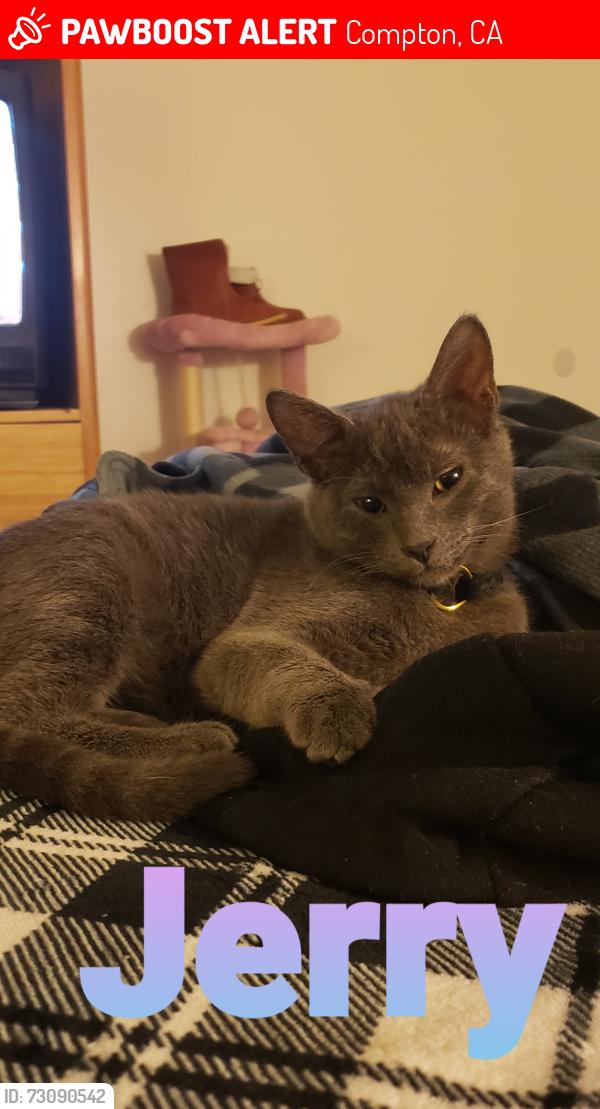

View Lost Cats Near Compton, CA

Jerry is Missing in Compton, CA

Share on

Status

LOST

Date Last Seen

June 6, 2026

Location Last Seen

Compton, CA 90220

Nearest Landmark

Near w Artesia blvd

Name

Jerry

Sex

Male

PawBoost ID

73090542

Species

Cat

Message from Owner

Help me find my cat

Comments on this Facebook alert

Suzan R.
2 months ago
General Information: Set up a scent station. Hang clothes with your scent on it (Worn clothing from owner) high up outside so the familiar scent can travel and guide the cat back home. Ask your neighbors to check their yard/could be accidently stuck in their garage or shed. (If applicable) Check doorbell or home camera - or ask neighbors to check their camera. Post Fliers with a picture of the cat and your contact information in the area the cat went missing. Not everyone is on Social Media and posters have worked in that if spotted a location can be provided. If a cat is scared they make themselves safe by finding a good hiding spot and often times hide in silence. Look in bushes - bring a flashlight and look for shining eyes. Best time to find your cat is in the early morning hours when the noise level is low and they feel safe. Leave an access point open for the cat to return. This is important if they do come back in the middle of the night. Prayers your cat returns/ or is found safely. Beware of scammers.
Reply
LunaMoon G.
2 months ago
Check the shelter a couple of times a week, bring proof of ownership; Vet bills, pictures, vaccine records
Reply
Kevin M.
2 months ago
Go around late at night calling them with food and flashlight to catch their eyes. Check around your neighborhood under houses and in small places where they may hide. Put stuff out that has yours and their scent on it. Hang flyers around for people to see. Check shelters and vets daily. Update chip info if they have a chip and its has not been update since a move. Ask neighbors to check in their garages incase they ended up trapped in one. I pray you get your baby back safe and soon.
Reply
LunaMoon G.
2 months ago
LunaMoon G.
2 months ago
PawBoost delivers the printable flyer directly to your email inbox and hosts it directly within your online account dashboard.The system provides multiple ways to access a free flyer:1. In Your Email InboxThe moment a lost or found report is submitted, PawBoost automatically sends a confirmation message to the registered email address. That message contains a direct link to instantly view and print the auto-generated PDF flyer template.2. In Your Account Dashboard (Website & App)Logging into the profile via the PawBoost Login Portal or opening the official mobile app provides full access to the active alerts.Navigate to the "Manage Pet" section for the active alert.Click the "Get Free Flyer" or "Download Flyer" button.The file can be downloaded directly to a phone or computer as a PDF, bypassing the need to check email messages.3. The Standalone Flyer Tool: If an account hasn't been created yet or the user wants to skip the standard alert process entirely, they can use the standalone, form-based PawBoost Free Flyer Generator. This tool generates a printable poster instantly on the screen for immediate downloading, without requiring a registration workflow.
Reply
LunaMoon G.
2 months ago
LunaMoon G.
2 months ago
LunaMoon G.
2 months ago
🚨Please follow these instructions
Reply
LunaMoon G.
2 months ago
Joseph Soboń Going in is better.
Reply
LunaMoon G.
2 months ago
Precious kitty 🙏
Reply

Help this alert reach more local people Help more people see this pet

Share this Facebook post with nearby friends, neighborhood groups, or anyone who may recognize Jerry. The more people share and engage with it, the more Facebook will show it to others nearby.

Open Facebook PostOpen Post
Post link https://www.facebook.com/LostPetsLosAngelesCA/posts/1337634801913021
Pawboost White Dog Hero

JOIN THE

RESCUE

SQUAD

The Rescue Squad™ is a group of 7,670,389 pet lovers who have signed up for local lost & found pet alerts.

Join The Rescue Squad™

Contact Owner